Find LinkedIn Influencers by Keyword, Niche, and Real Engagement Data
Search by topic. Filter by posts per month, reactions, connections, and location. Or let AI Creator Match search LinkedIn posts, articles, and expert roundups to build a vetted shortlist automatically. Enrich profiles with follower data, engagement rate, and posting cadence when you need it.
LinkedIn has no influencer search tool - so teams guess and scroll
There's no creator marketplace on LinkedIn. No filter for "posts per month" or "engagement rate." Most teams scroll their own feed, ask colleagues, or pay an agency for a list they can't verify. The result is a handful of names biased toward whoever the team already follows.
Find LinkedIn influencers with a workflow that actually scales: keyword search, AI-powered discovery, granular filters, and enriched profile data - all in one place.
Search by keyword or let your campaign brief drive every search decision
Two paths to find LinkedIn influencers. Type a niche keyword for instant database results. Or select a campaign - its content keywords, creator regions, competitor exclusions, and follower thresholds become the search brief that shapes AI discovery from first query to final ranking.
Keyword Tag Search
Type keywords like "demand gen" or "supply chain" and search the creator database instantly. Add multiple tags to scope results by content relevance, headline match, and bio signals.
AI Keyword Suggestions
After the first keyword, AI analyzes the niche and suggests eight related terms. Add them with one click to broaden coverage or sharpen focus without guessing what to search next.
Campaign-Driven Search
Select a campaign and its data becomes the search brief: content keywords define what topics to search, creator regions set geographic scope, competitor names are auto-excluded, and follower ranges set audience thresholds. AI Creator Match uses all of it.
Campaign Brief → AI Strategy
AI agents read the combined campaign context - keywords, regions, audience, competitors - and generate targeted search queries across LinkedIn posts, Pulse articles, and expert lists. A campaign with five keywords and three regions produces a fundamentally different search than a single keyword alone.
Narrow results with filters built specifically for LinkedIn creator data
After keyword search or AI Creator Match returns results, apply LinkedIn-specific filters to find exactly the profiles you need. Filter by engagement metrics, posting cadence, audience size, geography, and content niche. Sort by any metric to surface the strongest matches first.
Engagement Metrics
Filter by median reactions per post, shares per post, and comments per post. Remove high-follower accounts with low engagement in seconds.
Posting Cadence
Set a minimum posts-per-month threshold. Consistent creators drive reliable campaign performance - one-post wonders don't.
Follower & Connection Ranges
Scope results by follower count and connections. Target micro-influencers (10K-50K), mid-tier (50K-500K), or macro (500K+) with preset or custom ranges.
Location, Language & Niche
Filter by country, language, content categories, and target audiences. Find LinkedIn influencers who reach decision-makers in specific regions and industries.
Campaign-Scoped Relevance
Select an active campaign to overlay its product keywords and target audience criteria onto results. Sort by relevance score to see campaign-fit creators first.
Enrich profiles individually or in bulk - metrics populate in parallel
Raw LinkedIn profiles lack the data needed for comparison. Toksta runs five enrichments in parallel, pulling follower count, engagement rate, posting cadence, and firmographics.
Single-Click Enrichment
Enrich any LinkedIn creator with one click. Follower count, engagement rate, posts per month, headline, company, and location populate within seconds.
Bulk Enrichment
Select multiple creators across pages and enrich them all at once. Five profiles process in parallel. Status tracking shows progress per profile.
Enrichment Powers Filters
The filters rely on enriched data. Enrich first, then filter by reactions, shares, posting cadence, and connections with full precision.
Search beyond the bio. Target creators by content and audience
Finding the right influencer means knowing exactly what they post and who actually interacts with it. Toksta's AI analyzes their content history and actual engagers to guarantee a perfect match for your search criteria.
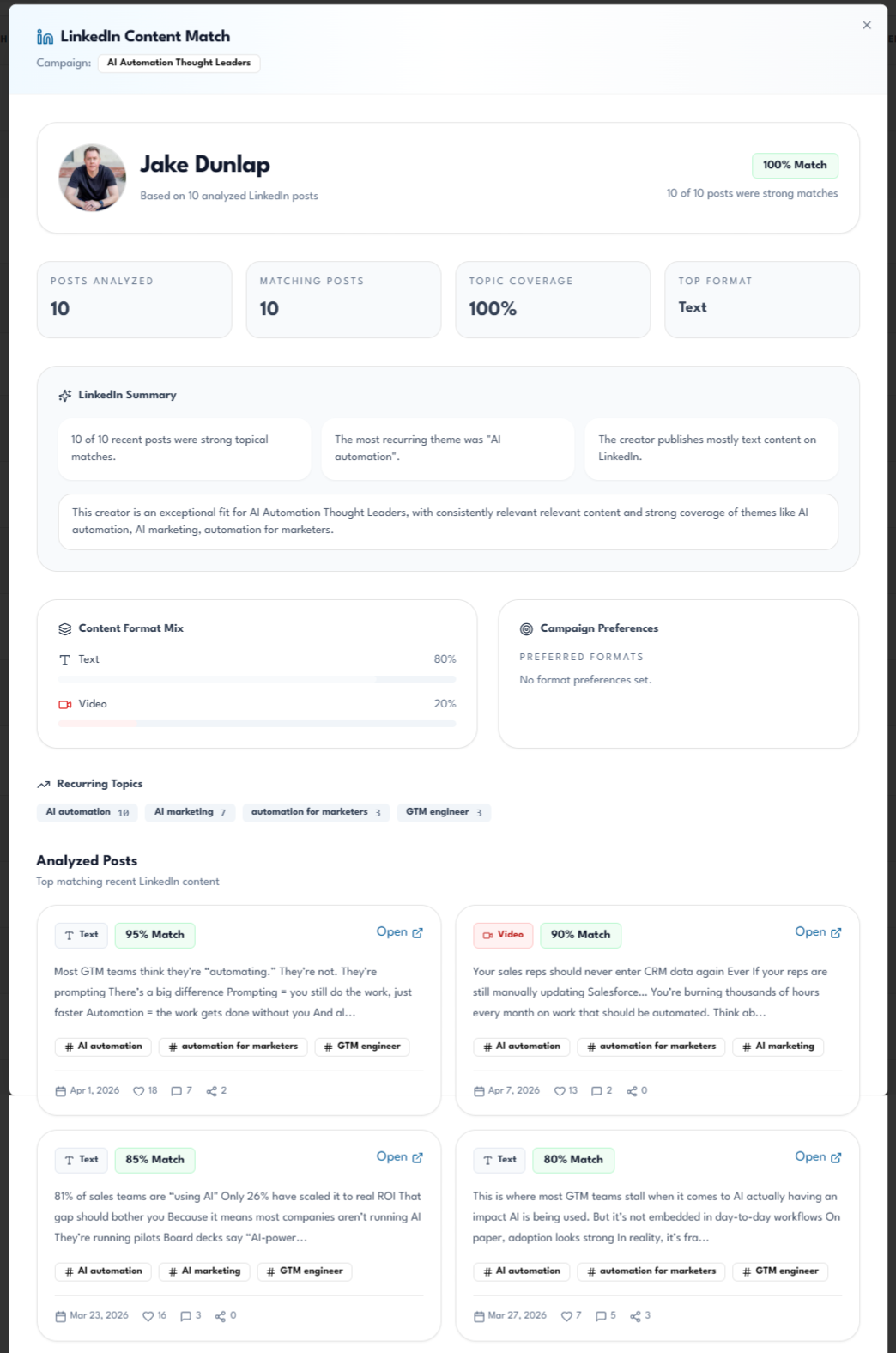
Topic & Format Search
Stop guessing based on a creator's headline. Toksta searches through their recent posts to see how often they actually talk about your required keywords and in what formats.
- Keyword match density scoring how consistently they post about your topic
- Format breakdown filter for creators who post videos, carousels, or text
- Post summaries see their most relevant content instantly
Target Active Engagers
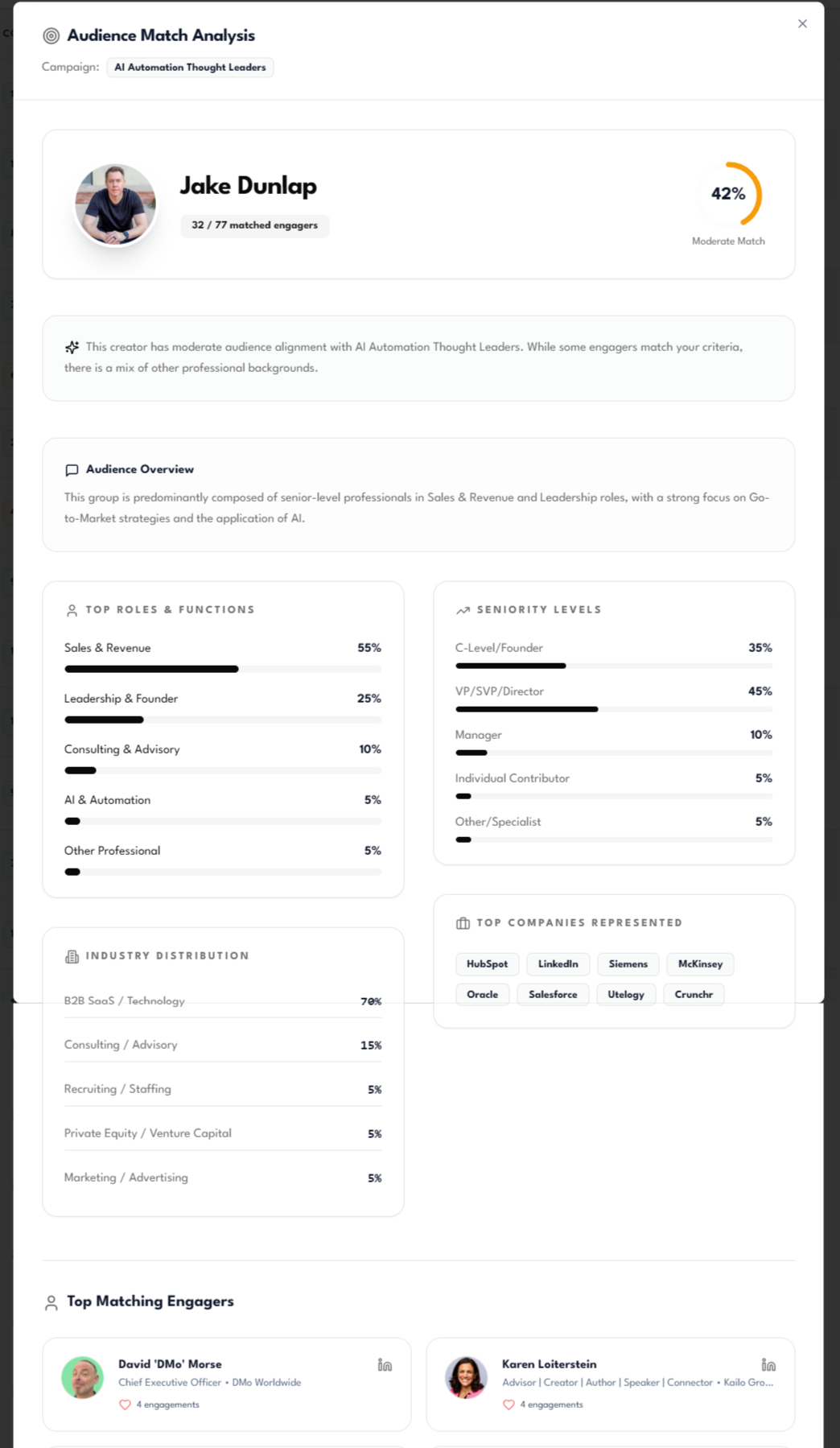
Don't just search for follower counts. Toksta finds influencers based on who actively comments and reacts, scoring their audience against your ideal customer profile (ICP).
- ICP audience match scoring engagers against target buyer roles
- Seniority targeting instantly see if they reach decision-makers vs. ICs
- Verified B2B reach see top matching companies and job titles engaging
Find LinkedIn influencers in four steps
Search by keyword
Enter niche keywords. AI suggests related terms. Results load instantly from the creator database.
Run AI Creator Match
One click extends the search to LinkedIn posts, articles, and expert lists. AI agents vet candidates.
Filter and sort
Apply LinkedIn-specific filters: reactions, shares, posts/month, connections. Sort by any metric.
Enrich and shortlist
Enrich top profiles with full data. Compare side by side. Save to creator lists or analyze further.
Find LinkedIn influencers for any B2B campaign type
Product Launches
Search for creators covering your product category. Filter by follower range and posting cadence to find voices with consistent reach.
Thought Leadership
Keyword search plus content category filters find influencers who publish regularly. Enrich profiles to compare engagement rates.
Regional Campaigns
Filter by country and language to find LinkedIn influencers who reach specific geographies. Match regional campaigns to local figures.
Competitive Intel
Search competitor brand names as keywords. See which creators discuss competing products and align their content with your brand.
Common Questions
Stop scrolling LinkedIn for creators who might be relevant.
Find LinkedIn influencers with keyword search, AI discovery, and granular filters purpose-built for B2B.
Get started for free